
Back in 2022, I created the first integrated camera system for the MARS-X robot. It was… kind of bad. It was basically a Raspberry Pi HQ camera module wrapped in a 3D printed case, along with a Raspberry Pi 4B. (This was back when RPi’s were impossible to get, so it took me weeks to secure three of them.) The Pi was mostly just there to read data from the cameras, and then send it over an Ethernet connection to the robot controller. One of my favorite features: they used PoE, so you basically just had to plug in a cable, wait for the Pi to boot up, and then it should start publishing frames on a ROS topic. Very user-friendly. In theory.
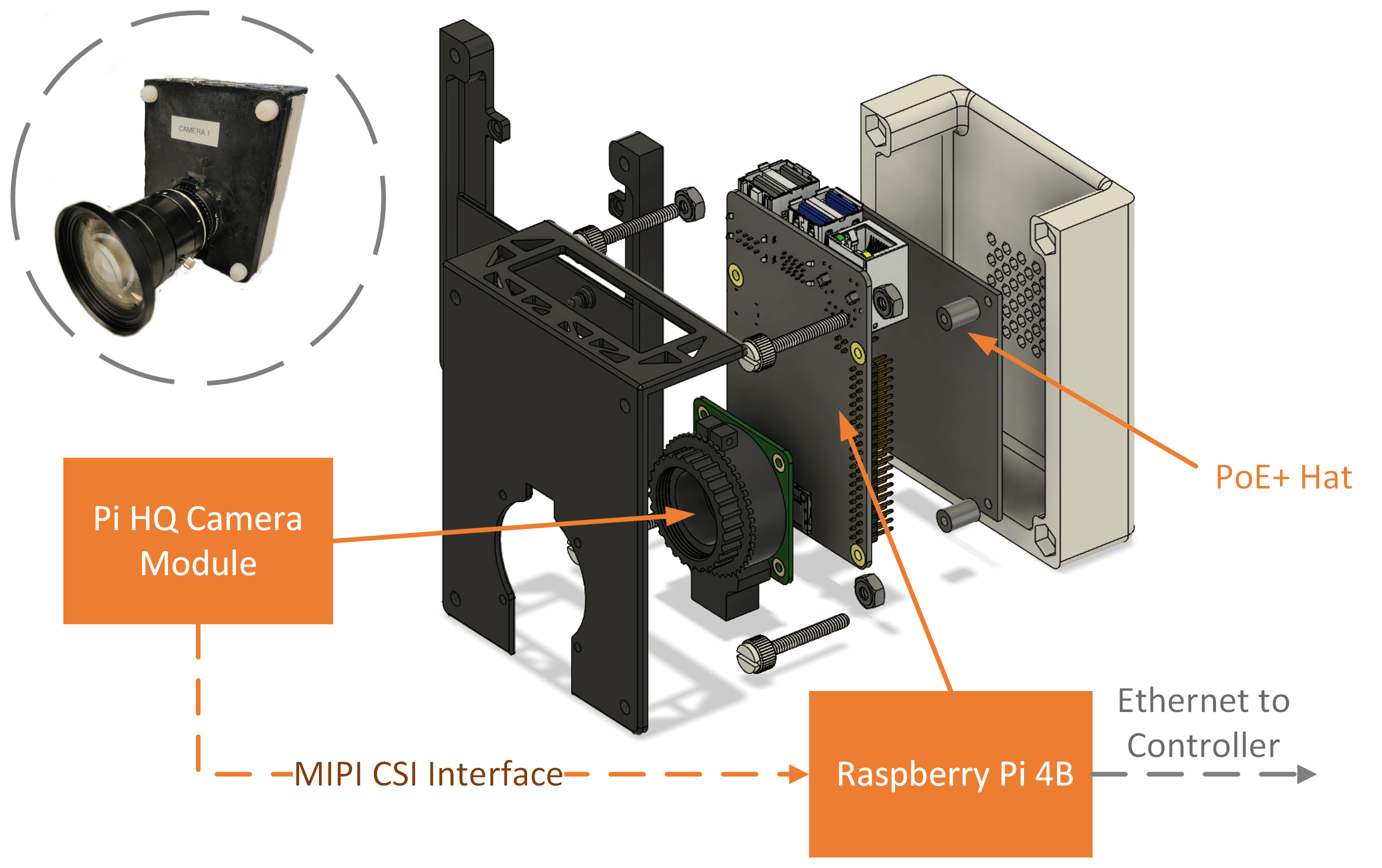
In practice, these cameras had a long list of issues, most notably:
- The cameras kept falling apart when they were used in the field. Apparently, that sketchy 3D printing was no match for this kind of vibrational environment.
- The cameras got really hot under operation. Turns out, putting modern electronics in a little plastic box and subjecting it to a 95-degree Georgia summer is a recipe for problems. Luckily, throttling wasn’t a show-stopper, but it wasn’t ideal. Also, the PoE hat I was using has an extremely whiny little fan on it, which makes the whole situation a lot less pleasant.
- The lenses we were using (I believe they were these) are really too narrow for our purposes. Plus, they’re not very sharp.
- The cameras don’t have auto-focus. Relying on manual focus was annoying. Every time you started data collection, you had to spend 10 minutes fiddling with the lenses while squinting at the display in the sun. And half the time, the videos still ended up blurry.
In the beginning, we also had issues with the software, but I’ve gradually made it more reliable. Now you can usually just plug the cameras in and expect them to work. That’s made things a lot easier for us over time.
Between then and now, I’ve also managed to mitigate some of the hardware issues. I bought better lenses for the cameras. Auto-focus is probably never going to happen, but I was at least able to implement a basic focus peaking feature in the user interface that highlights sharp edges in red. It’s better than nothing. Even so, many issues are inherent to the camera hardware and can’t be fixed without changing the design.
Camera Module Redux
The first version of anything is usually a learning experience. I learned a lot from the first version of the MARS camera modules. Recently, I had the opportunity to design a second iteration that fixes most of the issues from the first one and adds new features.
I completely redesigned the case so that the whole thing is more robust. There are a lot more screws this time around, so assembly and disassembly is a little more complicated, but I think it’s worth it. Plus, I increased the size enough that I could fit a proper 80 mm fan in there, so the cooling and noise issues are now both a thing of the past. That cooling upgrade was definitely necessary, because I upgraded to a Raspberry Pi 5 as well, and those things can run hot.

Because the Pi 5 has two CSI connectors, it allows for the nifty trick of having two separate sensors in the same module. I decided to supplement the main Pi HQ camera with a secondary Pi Camera 3. What initially caught my eye is that they have a variant with no IR filter, which, when combined with an (included) blue gel, can be used for things that might traditionally require a $5000 multi-spectral camera, like measuring vegetation indices.

Software Issues
My original theory of the camera module upgrade was that the software could essentially stay the same between the V1 and V2 hardware. This would have made my life a lot easier. Sadly, it was not meant to be.
I wrote the software running on the V1 camera modules to take advantage of the Pi 4B’s built-in h264 encoder to compress the video from the camera before sending it over the wire. Back in 2022, I spent about a week getting this to work, and ended up source-compiling a version of libav. Fun times.
Fast-forward to 2024, when I discovered that the Pi 5 I’m using in the V2 modules doesn’t even have a hardware h264 encoder. They removed it for, uh, reasons, I guess. There was a claim floating around that the Pi 5 could encode 1080p at 60 FPS using a single core, a claim which I’ve since confirmed to be a dirty lie. Maybe I was using the wrong encoder settings?
Anyway, without any hardware encoding support, I had to fall back on MJPEG. This is much easier to encode on the CPU (to the point where the Pi 5 can comfortably encode data from both connected cameras at 30 FPS), but sacrifices some bandwidth efficiency. Honestly, I don’t really care about that too much, seeing as even on the V1s I was using a very high bit rate in order to preserve quality for machine vision applications. Since I was already using libav anyway, it was a fairly simple matter to modify the camera software for MJPEG encoding. So far, so good.
Decoding
The real issues started on the controller side. We recently upgraded MARS-X to an Nvidia Jetson AGX Orin embedded computer. It has all sorts of fancy-shmancy media capabilities, including hardware decoders for h264 and JPEG. This is good, because even though we primarily dump the compressed data coming over the wire from the cameras into a ROS bagfile, we also want to display a real-time feed on the screen so that the user can see what they’re doing. That requires decoding data from multiple cameras with minimal latency, and, since most of the CPU/GPU resources on the Jetson are already spoken for by our machine vision pipeline, it has to be done with dedicated hardware.
Jetpack Linux on the Jetson ships with a version of libav that’s compiled to use the NVDEC hardware (although not NVENC, so you might as well abandon your dream of using a $2000 industrial computer as a streaming machine). That makes the decoding pipeline quite simple for the V1 cameras, since we can once again fall back on good old libav. However, I knew that trouble was brewing for the V2s, because libav on the Jetson does not support hardware MJPEG decoding. Fantastic.
Instead, I had to take a deep breath and learn about something called the Jetson Multimedia API. I don’t really have time for this kind of thing, but luckily Nividia includes a JPEG decoding example in their Linux distro. That was enough to get me started.
I ended up writing a ROS image_transport plugin that decodes JPEGs using the Multimedia API. After a few days, I got it working pretty well, and it was displaying images in the robot dashboard. However, I was having the weirdest issue ever in which every fourth frame was showing up blank. A quick test with software JPEG decoding revealed that it was not a problem with the camera, and instead a decoding issue.
After a lot of random Googling (my specialty), I finally came across an obscure forum thread from someone with the exact same issue, revealing that there was a bug in the version of libnvjpeg that ships with Jetpack. Downloading the patched version of libnvjpeg.so linked in the post fixed the issue immediately, so good job Nvidia. I was going to say something snarky here about a trillion-dollar company failing at basic QC, but then I realized that, as long as Microsoft still exists, Nvidia can never hope for more than runner-up status.
Moar Cameras
Most of my previous work has been done with three cameras on the robot, mainly because we only had three cameras. We were starting to realize, however, that for some applications, such as 3D reconstruction, 3 cameras aren’t good enough. But what about six cameras? With 3 V1 and 3 V2 camera modules, we could potentially double our camera density.
There’s not really any technical limitation preventing the use of six cameras. I did spend a late night here are the lab the day before data collection trying to get them all set up. The next morning, we hauled the robot up to Tifton to collect cotton boll data, and I just had to cross my fingers that everything would work.

Camera Calibration
The first sort-of snag I hit was with camera calibration. I developed a camera calibration interface that guides the user through the process using on-screen prompts. It works fantastically with three cameras, but with six, the OpenCV calibration algorithm starts using so much CPU that the Jetson gets bogged down and the UI starts lagging. A quick hack that I implemented around 8:30 the night before was only letting it process one image every half-second to limit CPU usage.
Even so, I still had trouble in the field getting a good calibration with six cameras, I think because there was so much variation in camera angles. Every time I managed to finish calibration, at least one or two cameras would have incorrect pose estimates. I ended up calibrating the cameras in two sets, and then manually merging the two calibrations later, which worked pretty well, actually. I think I’ll try to automate this approach in the future.

Finally, with all the cameras working, we were able to collect data.


By this time, it was, like 3 in the afternoon, so not exactly optimal data collection time. Even with a canopy, there were some lighting issues that will make processing data very annoying. The next step is to process all the data using a modified version of my flower counting approach to count and localize all the bolls in the field. It kind of works, but I have no ground-truth data, so who knows if this is accurate.

Check back here for more information about this project. It’s going to take me awhile to work out all the bugs.
No responses yet